BH1750: measure light in lux
The BH1750 from ROHM is a digital ambient light sensor. It contains a photodiode, an amplifier and a 16-bit converter in one small chip. It sends the result through I²C as a number of counts. The library divides the counts by 1.2 to get the illuminance in lux. The spectral response of the photodiode is close to the sensitivity of the human eye, so the value agrees with a light meter. The range is about 1 to 65535 lx. You can extend the range at both ends with the MTreg register.
A photoresistor is cheaper, but it gives only a relative analog value. A BH1750 gives a calibrated number that does not change with the supply voltage or the ADC of the ESP32.
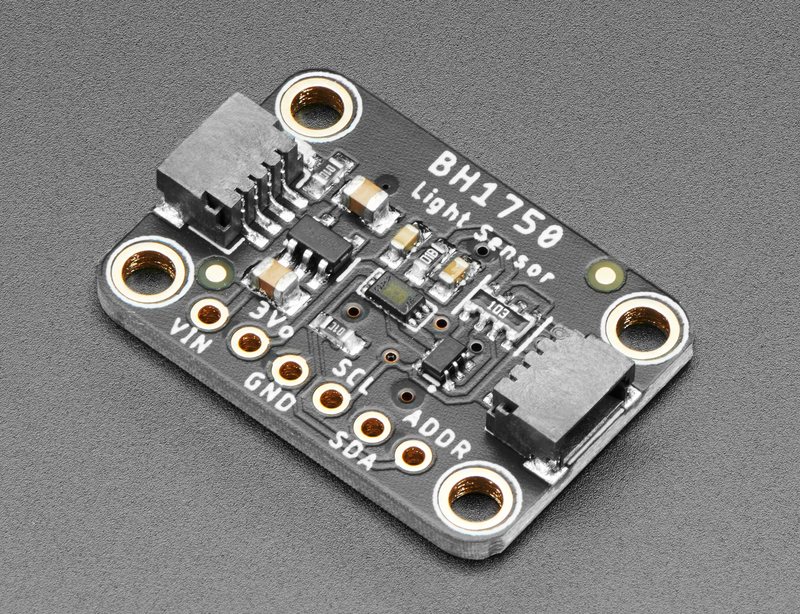
Photo: Adafruit (Bryan Siepert), CC BY-SA 3.0
Move the light slider or select a preset. The scale is logarithmic: each step is ten times more light. The blue line is the BH1750 result. The orange line is the ADC value of a photoresistor divider on the same chart (right axis).
How it works
Counts to lux
The chip integrates the photodiode current for a fixed time. Then it gives a 16-bit count (0–65535). In H-resolution mode at the default MTreg, 1 count is 1/1.2 lx, so lux = count / 1.2. The 1.2 is the typical measurement accuracy factor from the datasheet. It can be between 0.96 and 1.44 for one chip.
Three resolution modes
- H-resolution: 1 lx steps, 120 ms. Use this mode for most projects.
- H-resolution 2: 0.5 lx steps, 120 ms, half the maximum. Use it in dim light.
- L-resolution: 4 lx steps, 16 ms. Use it for fast changes.
Each mode is available as “continuous” or “one-time”. In one-time mode, the chip goes to power-down after each measurement.
MTreg: change the sensitivity
MTreg sets the measurement time (31–254, default 69). The count increases in proportion to MTreg, so the library multiplies by 69/MTreg to correct the lux value. At MTreg 254 in H-resolution mode 2, the step is about 0.11 lx. At MTreg 31, the maximum increases to more than 100 000 lx, so direct sunlight does not saturate the sensor.
Close to the human eye
The peak sensitivity is at about 560 nm (green). The response is low for infrared light. A photoresistor or a bare photodiode can react strongly to infrared from lamps or the sun. It can then read “bright” where a person sees dim light.
BH1750 and a photoresistor
A photoresistor in a divider gives an ADC value that is not linear. It saturates at both ends of the scale and changes with temperature and from part to part. Use it for “dark or light” decisions. Use the BH1750 when you need a number in lux. Refer to Photoresistors and Analog inputs.
Typical light levels
| Condition | Approx. lux |
|---|---|
| Full moon | 0.1–0.3 |
| Living room | 50–150 |
| Office desk | 300–500 |
| Overcast day | 1000–10 000 |
| Direct sunlight | 32 000–100 000 |
Wiring
Connections
| BH1750 pin | ESP32 | Notes |
|---|---|---|
| VCC / VIN | 3V3 | The chip operates from 2.4–3.6 V. Modules with a regulator also accept 5 V. |
| GND | GND | Common ground. |
| SDA | GPIO 21 | Default I²C data pin. |
| SCL | GPIO 22 | Default I²C clock pin. |
| ADDR | GND or 3V3 | LOW: 0x23. HIGH: 0x5C. |
For more data about I²C addresses and the scanner sketch, refer to the OLED display page.
Build steps
- Install the libraryIn the Library Manager, search for “BH1750”. Install the library by Christopher Laws.
- Connect four wiresConnect VCC, GND, SDA and SCL as the table shows.
- Run the I²C scannerMake sure that the scanner finds 0x23 (or 0x5C).
- Upload the sketchOpen the Serial Monitor at 115200 baud. Cover the sensor with your hand and make sure that the value decreases.
- Install the sensorPoint the sensor window at the light that you want to measure. Keep LEDs on your project away from the sensor.
Troubleshooting
begin()returns false or the value is −2: the sensor does not respond. Examine the wires. Run the scanner. Use the address that the scanner shows.- The value stays at 54612 lx: the count is at its maximum (65535 / 1.2). Decrease MTreg or use H-resolution mode (not mode 2).
- The value stays at 0 in a dark room: the light is less than one step. Use H-resolution mode 2 and increase MTreg to 254.
- The value is too high indoors: an LED on your board or a nearby display shines on the sensor. Put a small tube around the sensor.
- The value is too low behind a window or a case: glass and plastic absorb light. Calibrate against a known light meter and multiply by a correction factor.
Code
1 · Read lux every second
Library: BH1750 by Christopher Laws (Library Manager). The library does not start the I²C bus, so call Wire.begin() first.
bh1750_basic.ino
              #include <Wire.h>
              #include <BH1750.h>

              BH1750 lightMeter;   // address 0x23 (ADDR low)

              void setup() {
                Serial.begin(115200);
                Wire.begin();        // SDA = GPIO 21, SCL = GPIO 22
                if (!lightMeter.begin(BH1750::CONTINUOUS_HIGH_RES_MODE, 0x23, &Wire)) {
                  Serial.println("BH1750 not found. Run the I2C scanner.");
                  while (true) delay(1000);
                }
              }

              void loop() {
                if (lightMeter.measurementReady()) {
                  float lux = lightMeter.readLightLevel();
                  Serial.printf("Light: %.1f lx\n", lux);
                }
                delay(1000);
              }
2 · Automatic range for dark and bright light
This sketch changes MTreg and the mode, as the simulator shows. It gives fine steps in the dark and does not saturate in sunlight.
bh1750_autorange.ino
              #include <Wire.h>
              #include <BH1750.h>

              BH1750 lightMeter;

              void setup() {
                Serial.begin(115200);
                Wire.begin();
                lightMeter.begin(BH1750::ONE_TIME_HIGH_RES_MODE);
              }

              void loop() {
                // one-time modes start a new measurement each time you call configure()
                float lux = 0;
                if (lightMeter.measurementReady(true)) lux = lightMeter.readLightLevel();

                if (lux < 10) {                       // dark: most sensitive setting
                  lightMeter.setMTreg(254);
                  lightMeter.configure(BH1750::ONE_TIME_HIGH_RES_MODE_2);
                } else if (lux > 40000) {             // sunlight: largest range
                  lightMeter.setMTreg(32);
                  lightMeter.configure(BH1750::ONE_TIME_HIGH_RES_MODE);
                } else {                              // normal
                  lightMeter.setMTreg(69);
                  lightMeter.configure(BH1750::ONE_TIME_HIGH_RES_MODE);
                }
                Serial.printf("%.2f lx\n", lux);
                delay(1000);
              }
3 · Night light with hysteresis
Use two thresholds, so the output does not switch on and off when the light is near one threshold. For a bright LED strip, use a MOSFET. Make sure that the light of your LED does not shine on the sensor.
bh1750_nightlight.ino
            #include <Wire.h>
            #include <BH1750.h>

            BH1750 lightMeter;
            const int LED_PIN = 2;
            const float ON_BELOW  = 20.0;   // lx
            const float OFF_ABOVE = 40.0;   // lx
            bool ledOn = false;

            void setup() {
              Wire.begin();
              lightMeter.begin();          // CONTINUOUS_HIGH_RES_MODE, 0x23
              pinMode(LED_PIN, OUTPUT);
            }

            void loop() {
              if (lightMeter.measurementReady()) {
                float lux = lightMeter.readLightLevel();
                if (!ledOn && lux < ON_BELOW)  ledOn = true;
                if (ledOn && lux > OFF_ABOVE)  ledOn = false;
                digitalWrite(LED_PIN, ledOn ? HIGH : LOW);
              }
              delay(200);
            }
Resources
- ROHM BH1750FVI datasheetMeasurement modes, MTreg, the 1.2 factor and the spectral response.
- BH1750 library by Christopher Laws (GitHub)Source code and examples, which include the auto-range example.
- Adafruit BH1750 guidePinouts of the breakout board and STEMMA QT wiring.
- PhotoresistorsThe low-cost analog light sensor, for comparison.
- OLED displayThe I²C scanner and how to show the lux value on a screen.
- Arduino librariesHow to install and update libraries.